
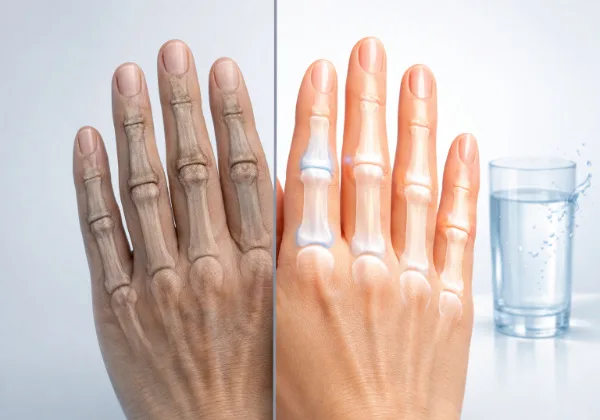
Typing with arthritis in hands tips, Typing should feel natural, not painful. But if you live with arthritis, even a simple email can feel like a workout. Many people struggle with stiffness, swelling, and aching joints while typing. The good news? You can reduce pain without giving up productivity.
In this guide, you’ll learn practical, science-backed tips for typing with arthritis in hands. These tips focus on comfort, joint protection, and long-term relief. No gimmicks. Just real solutions that work.
Table of Contents
What Happens When You Type With Arthritis?
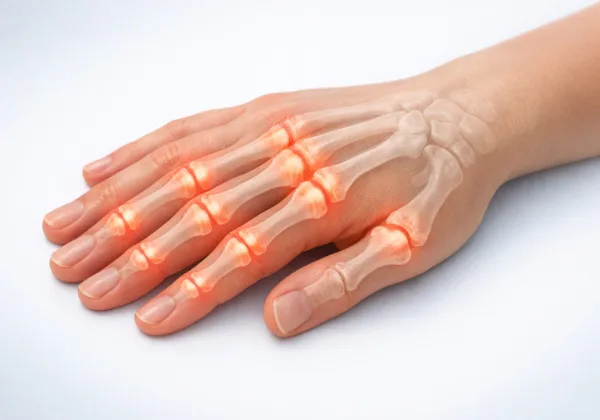
Arthritis affects joints in your hands and fingers. The most common types include osteoarthritis and rheumatoid arthritis. Both can make typing harder.
When you type, your fingers repeat small movements hundreds of times. That constant motion puts stress on already inflamed joints. Over time, pain increases.
Common symptoms while typing include:
- Stiff fingers, especially in the morning
- Swelling around knuckles
- Reduced grip strength
- Sharp or dull pain when pressing keys
Ignoring these signs can make things worse. That’s why learning typing with arthritis in hands tips matters early.
Why Typing Technique Matters More Than You Think
Many people blame arthritis alone. But poor typing habits often increase the pain.
If your wrists bend too much or your fingers strike keys hard, you add unnecessary strain. Small changes in posture and technique can reduce pressure on joints.
Think of it this way. Your hands are already working harder than usual. Don’t make them fight bad habits too.
Tip #1: Use a Soft-Touch or Ergonomic Keyboard
Not all keyboards feel the same. Standard keyboards often require more force to press keys.
Switching to a soft-touch or ergonomic keyboard can reduce joint stress. These keyboards need less pressure and allow a more natural hand position.
Split keyboards also help. They keep your wrists straight instead of angled inward.
This simple change often gives quick relief.
Tip #2: Keep Your Wrists Neutral
Your wrist position plays a big role in pain.
When your wrists bend upward or downward, they increase pressure on joints and tendons. That leads to discomfort.
Keep your wrists in a neutral position. That means straight, not tilted.
You can achieve this by:
- Adjusting chair height
- Using a wrist rest
- Keeping the keyboard at elbow level
Good posture supports better typing with arthritis in hands tips.
Tip #3: Type Lightly, Not Hard
Many people hit keys harder than needed. That habit increases joint strain.
Modern keyboards respond to light touches. You don’t need to press hard.
Train yourself to type gently. It may feel strange at first, but your fingers will thank you.
Less force means less inflammation.
Tip #4: Take Frequent Breaks
Your joints need rest. Continuous typing increases stiffness and swelling.
Follow the 20-20 rule adapted for hands:
Every 20 minutes, stop typing for at least 20 seconds.
During that break, stretch your fingers and relax your hands.
Short breaks prevent long-term pain.
Tip #5: Do Simple Hand Exercises
Gentle movement helps keep joints flexible.
Try simple exercises like:
- Opening and closing your fist slowly
- Touching each fingertip to your thumb
- Stretching fingers outward
These exercises improve circulation and reduce stiffness.
According to arthritis research organizations, regular hand movement supports joint health and reduces discomfort.
Tip #6: Use Voice Typing When Possible
You don’t always need to type.
Voice typing tools have improved a lot. They work well for emails, notes, and even long documents.
Using voice input reduces strain on your fingers completely.
Mix typing with voice commands. This balance protects your joints over time.
Tip #7: Adjust Your Workstation Setup
Your desk setup affects your hands more than you think.
A poor setup forces your body into awkward positions. That increases joint stress.
Make sure:
- Your screen sits at eye level
- Your elbows stay at a 90-degree angle
- Your keyboard sits close to your body
Good ergonomics support pain-free typing.
Tip #8: Keep Your Hands Warm
Cold joints feel stiffer and more painful.
Warmth helps improve blood flow and flexibility.
You can:
- Wear fingerless gloves
- Use a warm compress before typing
- Keep your workspace at a comfortable temperature
Warm hands move better and hurt less.
Tip #9: Try Compression Gloves
Compression gloves can provide mild support and improve circulation.
Many people find them helpful while typing.
They don’t cure arthritis, but they reduce swelling and discomfort.
Choose gloves that fit snugly but not too tight.
This tip works well alongside other typing with arthritis in hands tips.
Tip #10: Listen to Your Body
This might be the most important tip.
Pain is a signal. Don’t ignore it.
If typing hurts, stop and adjust. Change position, take a break, or switch tasks.
Pushing through pain often makes symptoms worse.
Respect your limits. That’s how you protect your hands long term.
Best Daily Habits to Support Pain-Free Typing

Typing comfort doesn’t depend on one change. It comes from consistent habits.
Stay active. Gentle movement keeps joints flexible.
Stay hydrated. Your joints need proper lubrication.
Maintain a healthy weight. Less strain improves overall joint function.
These habits support all typing with arthritis in hands tips and improve results.
When Should You See a Doctor?
Sometimes pain goes beyond daily discomfort.
You should consult a doctor if you notice:
- Severe swelling
- Sudden loss of hand function
- Persistent pain that doesn’t improve
- Joint deformity
Early treatment can prevent further damage.
Doctors may suggest therapy, medication, or specialized tools to help.
Common Mistakes People Make

Many people unknowingly worsen their symptoms.
They:
- Ignore early pain
- Use stiff keyboards
- Skip breaks
- Type in poor posture
Fixing these mistakes can make a big difference.
Small adjustments often lead to big relief.
Can You Still Work Efficiently With Arthritis?
Yes, absolutely.
Many professionals manage arthritis and continue typing daily. The key lies in adapting your approach.
Use the right tools. Follow smart habits. Take care of your joints.
Productivity doesn’t have to suffer.
In fact, once you apply these typing with arthritis in hands tips, you may work more comfortably than before.
Frequently Asked Questions
How can I type comfortably if I have arthritis in my hands?
Typing comfortably with arthritis requires small but effective changes. The best typing with arthritis in hands tips include using an ergonomic keyboard, keeping your wrists in a neutral position, and typing with a light touch. Taking frequent breaks and doing simple hand stretches also helps reduce stiffness and pain while typing.
What is the best keyboard for typing with arthritis in hands?
The best keyboard for typing with arthritis in hands is an ergonomic or soft-touch keyboard that requires minimal force to press keys. Split keyboards and low-resistance keys are often recommended in typing with arthritis in hands tips because they reduce joint strain and improve hand positioning during long typing sessions.
Can typing make arthritis in hands worse?
Yes, excessive typing without proper care can worsen arthritis symptoms. Repetitive finger movements can increase inflammation and stiffness. However, following proper typing with arthritis in hands tips such as taking breaks, improving posture, and using supportive tools can help prevent further discomfort and protect your joints.
Are there exercises that help with typing pain from arthritis?
Yes, gentle hand exercises can reduce pain and improve flexibility. Common typing with arthritis in hands tips include finger stretches, fist opening and closing, and thumb-to-finger touches. These exercises improve blood flow and help keep joints flexible, making typing easier and less painful.
Is voice typing better for people with hand arthritis?
Voice typing is an excellent option for reducing strain on arthritic hands. Many experts include it in typing with arthritis in hands tips because it allows you to rest your fingers while staying productive. Combining voice typing with regular typing can significantly lower daily joint stress.
Final Thoughts
Typing with arthritis can feel frustrating. But you’re not stuck with the pain.
Simple changes can improve comfort quickly. Better posture, lighter typing, and regular breaks go a long way.
The goal isn’t perfection. The goal is consistency.
Protect your joints today, and your hands will support you tomorrow.
Not all wrist pain during typing comes from arthritis. Some cases may involve conditions like cysts. This article on Ganglion Cyst Wrist Joint Pain: When to Worry After 40 explains the warning signs you should not ignore.
Sources
- Arthritis Foundation
- Mayo Clinic
- National Institute of Arthritis and Musculoskeletal and Skin Diseases (NIAMS)
- Harvard Health Publishing
These sources provide reliable, research-based information on arthritis, joint care, and hand health.
Author Bio
Jennifer Collins is a wellness researcher and natural health writer focused on adults over 40. With 3+ years of experience in digital health content, Jennifer specializes in making science-backed nutrition and lifestyle strategies easy to follow and apply.
Health Disclaimer
This content is for informational purposes only and is not intended to diagnose, treat, or cure any disease. Always consult your healthcare provider before making changes to your diet or health routine. This article may include affiliate links, which come at no extra cost to you.